Enable Old Classic Chat on Facebook for Firefox, Chrome and Opera

It took me a while to recognize that I am not the only one who hated the new chat in the Facebook. While the old default chat was easy and comfortable, this new one never worked for me. However it did fine for some of my buddies but not for everyone.

For me, the new chat feature in Facebook never showed the available buddies and neither did it for me. This means while I was using this new chat, I was never online and it also didn’t show my online buddies. It was a long time since I could chat on FB and also there was no way of going back to the old classic chat of Facebook.

Well if you use any of the following browsers (Firefox, Chrome or Opera), then you can enable the old classic chat of Facebook and start using it without any hassles. What you need to do is just download and install an add-on/extension for these browsers that can disable this new chat and enable the old chat of Facebook.

The extension is called “Facebook Chat Sidebar Disabler” and is available for free to download on any of these browsers. Going back to the old chat will not affect any of your chat functionality as you can still chat, make a video call the same way as in the new chat.

Moreover the extension is safe to use (I have also started using the same), doesn’t auto like some page and doesn’t need any restart of the browser. So simple isn’t it? Give it a try.

Download Facebook Chat Sidebar Disabler for Firefox
Download Facebook Chat Sidebar Disabler for Chrome
Download Facebook Chat Sidebar Disabler for Opera

Access Facebook in Office with Facebook Excel

Be it at office, school or college Facebook is blocked in many organizations and there is not much that we can do to access it. While organizations block these social networking websites so that their employees do not engage in these activities and waste time but blocking the websites should be up to some extent as it can help them to reduce pressure and gain more productivity.

With the launch of Facebook Excel also called as Excelbook you can access your Facebook account while at office stealthily and fool your boss around. The application is exactly similar to the MS Excel and it seems that you are working on the Excel spreadsheet but in reality you would be checking your news feeds and other things of FB.

You just need to visit a web service called Hardlywork, provide your FB login credentials and allow the app to access your profile. The Facebook excel will present instantly before you where you can check all your activities.
Moreover, the Excel is dynamic in nature as you can search friends, look at pictures and videos, tag friends in pictures and check your news feed. Hovering the mouse over certain items in the sheet also shows you profile picture.

Isn’t it a great way to both access your profile at office and fool your boss.

Visit Hardlywork

Facebook Login Notifications: Additional Security Feature

I have come across many people who have lost their Facebook profile as someone has hacked their profiles. Although this is not easy but if you use some additional security features then it won’t be that simple as well.

Facebook had provided us with couple of security features using which we can ensure the authorized access only. One of such features was thehttps about which we had already written. Another security feature is called the Facebook Login Notifications, navigate to Accounts –>Account Settings –> Account Security to use this feature.

The Facebook Login Notifications feature ensures that only the person who is authorized can login to our facebook profile. This feature require us to enter a text code that is being sent to us on our cell phone or at the email, when someone try to login from an unrecognized computer. You can get your computer recognized so that it works in a better way.

The feature requires that you have already updated your phone number and the email ID failing which this service wouldn’t be of much help. The other side of the feature is that if you are logging from some other system then you got to have your mobile phone with you. So we advise you to use this feature only if you are suspecting any of your friends to hack your account.

How to do Video Chat From Facebook?

Facebook Video Chat:
Today the users of internet have moved to the Facebook , and many other Social networking sites. So as Other services like Yahoo , Skype allows you to do video chatting on the Internet . Now from Facebook you can also Video Chat with other friends. This is one of the most exciting application in Facebook called ”  We chat “.
To do this just login in your Facebook account.
Search for an Application ” we chat ” .


Click on that application and then click on allow that application

After that go to your homepage and then see on the down left side of your homepage where your other applications are listed.


Click on that application and select a friend which is online and click on it.


After that A chat box will be open below that will ask you to take permission from the other person of this application. press “” enter “.

When the other person click on that link and click on allow , you will see that person in your Active Chat list on the left side.


Click on your friend and enjoy Video Chatting On Facebook.

Trick to Post Empty Status on Facebook

Isn't it amazing to post empty post on Facebook.

Its very simple.By this you can impress your friends.

Steps:
1:Go to Facebook status

2:Type @[2:2: ]
3: post it.

How to Transfer your Orkut Photos to Facebook??

Using Application you transfer your Orkut photos to Facebook:

When you send or  import your photos from orkut to Facebook they are not removed, but only copied to your Facebook profile.
To be able to copy the photos from your Orkut to your Facebook profile you need to add facebook migrakut in your facebook account and there after follow all instruction mention in there application.

Add Migrakut App in your facebook Account

10 Sites to Buy Facebook Fans, Friends, Likes

How can you increase Facebook fans / friends / likes? Simply buy Facebook fans. Showing off a large number of Facebook fans has become a status symbol of your site community and people are buying  Facebook Fans to increase Facebook fan numbers. A whole new business model has developed for Facebook marketing services.

Where to Buy Facebook Fans / Likes / Friends

Here are some popular services which will increase Facebook fans for a price.
buy facebook likes

  1. Usocial Facebook Marketing – starting with only $197, they bring you 1,000 brand new targeted Facebook fans. For $8997.30 as a limited time offer, they get you 250,000 brand new targeted and real Facebook fans to your existing account or new account, delivered within several months. They also have custom packages to deliver upto 20 million Facebook fans!
  2. SocialKik - For non targeted fans – 1000 fans for $59, upto 50000 fans for $999. For targeted fans – 1000 fans for $79, upto 50000 fans for $1199. No bots nor spamming done and all orders are covered under a Money Back Guarantee.
  3. FacebookFans – In starter Silver plan for $39.97, buy 1000 Facebook Fans wherein 1000 Targeted Real Human Visitors will be invited to your fanpage! A choice of US or UK fans. In Gold plan, buy 5000 Facebook fans for $99.97.
  4. SocialPromotionz – Starting trial package for 500 targeted facebook for $40; you can buy upto 10000 Facebook fans for $740. All from USA.
  5. Fanbullet – Starting $79.95, will deliver 1000 real and targeted Facebook Fans (Likes) direct to your Facebook fan page within 2-4 weeks. Get 5000 Followers for $329.95 on your business or personal page within 4-6 weeks!
  6. Fanpage Hookup – For Non targeted fans – 500 fans for $74, and upto 25,000 fans for $1199. For targeted fans, 1,000 Facebook Fans for $174 and upto 25,000 Targeted Fans for $1699
  7. Webtraffic2010 – Starting at 300 fans for $14.99, they will sell 10000 Facebook Fans for $409.
  8. MyFBfans –  Starting at $29 for 2000 real fans in a week. Upto 50000 fans for $399!
  9. GetFansNow – Starter bronze plan with 1000 fans/likes for $97 and Gold plan of  5000 fans/likes for $247
  10. GettyFans – 1,000 Facebook Fans / Friends / Likes for $117 and upto 15,000 Facebook Fans / Friends / Likes for $557


buy facebook fans

Note that targeted fans are more expensive than non targeted fans. US and UK fans seem to be in extra demand and cost more. And obviously, the larger the number of fans for sale, the longer they will take to add to your account.

After people  buy Twitter followers and buy blog comments,  this was bound to happen. Now obviously a whole business has developed for Facebook marketing services. What are your thoughts on these services.

Warning: Read the fine print carefully before investing money into buying Facebook fans. Read the Facebook terms carefully if it violates there terms of service.

Disclaimer -  I  have never used any of the Facebook marketing services to increase Facebook fans. Please try them at your own risk

Please do comment on this Post & Let me know weather its working or not. So that i can make changes in this..Thank U

How to Enable Secure Facebook Browsing

Enable Secure Facebook Browsing

Enable secure Facebook browsing over https for more Facebook security of your Facebook account. When you browse on public internet access areas like internet cafe, libraries etc, there is a huge risk your Facebook login details might be detected by illegal third party software, while your Facebook login passwords travel across a unsecured internet connections.

facebook security


Facebook Secure Browsing

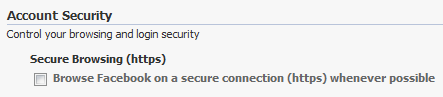
Facebook allows users to browse Facebook over asecure https connection, which will add added security to your Facebook account. The feature is not enabled by default, but you can change it in your Facebook settings easily.

Go to facebook.com/editaccount.php and visit the Account Security details. Look for the Secure browsing option – “Choose Browse Facebook on a secure connection (https) whenever possible”, tick the checkbox and Save.

secure facebook login

Next time you visit Facebook, look for the secure icon on the browser location bar and the https url instead of the http url.

facebook https url

Why doesn’t Facebook enable Secure browsing by default for all users? Well firstly the page loading speed is much slower over a secure connection. Secondly, not all Facebook apps will support secure https connections, so they will not work.
So enable HTTPS in Facebook and get a more secure Facebook browsing experience today. Do it now.

Please do comment on this Post & Let me know weather its working or not. So that i can make changes in this..Thank U

How to Update Facebook Status from Firefox

Update Facebook Status from Firefox-

FireStatus is a status update utility for multiple social networks, including FaceBook.


firestatus 20 Facebook Tips/Tricks You Might Not Know
Please do comment on this Post & Let me know weather its working or not. So that i can make changes in this..Thank U

How to Get Facebook Updates on Email

Get Facebook Updates on Email-
 NutshellMail consolidates your Facebook accounts through the inbox you use the most.

nutshellmail 20 Facebook Tips/Tricks You Might Not Know
Please do comment on this Post & Let me know weather its working or not. So that i can make changes in this..Thank U

How to Hide Your Online Status on Facebook Chat from Select Contacts

Hide Your Online Status on Facebook-

Facebook has integrated friends list with Chat and you can also choose which of these list members get to see you online.

hide 20 Facebook Tips/Tricks You Might Not Know
Please do comment on this Post & Let me know weather its working or not. So that i can make changes in this..Thank U

How to Post Your Blog Posts to Your Facebook Wall Automatically

Post Your Blog Posts to Your Facebook Wall Automatically-

Wordbook allows you to cross-post your blog posts to your Facebook Wall. Your Facebook “Boxes” tab will show your most recent blog posts.

wordbook 20 Facebook Tips/Tricks You Might Not Know
Please do comment on this Post & Let me know weather its working or not. So that i can make changes in this..Thank U

How to Create Quiz on Facebook Easily

Create Quiz on Facebook Easily-

LOLapps provides quiz creator that can be employed to conjure up these popular personality quizzes that are so widespread in Facebook.

Facebook Tips & Tricks
Please do comment on this Post & Let me know weather its working or not. So that i can make changes in this..Thank U

How to Access Facebook Chat on Desktop

Facebook Chat on Desktop-

Gabtastik and digsby let you keep Facebook chat sessions open on your Windows desktop outside of your regular web browser, using minimal screen real estate and system memory.

Please do comment on this Post & Let me know weather its working or not. So that i can make changes in this..Thank U

How to Remove Facebook Advertisements

How to Remove Facebook Advertisements-

This Greasemonkey script – Facebook: Cleaner removes many of the annoying ads and updates that unavoidably appear on your Facebook pages.

remove ads on facebook
Please do comment on this Post & Let me know weather its working or not. So that i can make changes in this..Thank U

How to Syncs Photos of Facebook Friends with Contacts in Microsoft Outlook

Photos of Facebook Friends with Contacts-

OutSync is a free Windows application that syncs photos of your Facebook friends with matching contacts in Microsoft Outlook. It allows you to select which contacts are updated. So you can update all contacts at once or just a few at a time.

outsync 20 Facebook Tips/Tricks You Might Not Know
Please do comment on this Post & Let me know weather its working or not. So that i can make changes in this..Thank U

How to Display Selected Pictures Only on your Facebook Profile Page

Display Selected Pictures on your Facebook Profile Page-

A little-known feature in Facebook that lets you decide who shows up in that Friends box. Click that "edit" pencil in your Friends box and type the names of your best friends in the box that says "Always show these friends"

friend photos 20 Facebook Tips/Tricks You Might Not Know
Please do comment on this Post & Let me know weather its working or not. So that i can make changes in this..Thank U

How to Know When Facebook Friends Secretly Delete or Block You

 Facebook Friends Secretly Delete or Block You-

X-Friends is a unique tool for tracking friends that disappear from Facebook.

X friends 20 Facebook Tips/Tricks You Might Not Know
Please do comment on this Post & Let me know weather its working or not. So that i can make changes in this..Thank U

How to Create a Photo Collage Using Pictures of Your Facebook Friends

Create An Album of Your Facebook Friends -

Click on Friends tab. Proceed to More tab. From "Choose an option" dropdown, choose any of the dashes "" . Your Facebook friends collage is right on your computer screen.

create photo album in facebook
Please do comment on this Post & Let me know weather its working or not. So that i can make changes in this..Thank U

How to Download Facebook Photo Albums

Download Facebook Albums-

Note- Use only Morzilla to get this addons

FacePAD: Facebook Photo Album Downloader allows you to download your friends’ facebook albums, Events albums, and Group Albums, en masse, with the click of a button.

download facebook photo album. facebook Tips & Tricks
Please do comment on this Post & Let me know weather its working or not. So that i can make changes in this..Thank U

Most Searches

2leep.com